
Most people running multiple TikTok accounts are not doing anything wrong. They just want to keep their content separate, manage a few clients, or test ideas without risking their main profile.
But a lot of them run into problems anyway. Not because TikTok has an issue with multiple accounts, it actually allows them. But because of how those accounts are being run day to day.
So if your reach has been dropping or your accounts keep getting restricted out of nowhere, this is probably what is going on.
Why Managing Multiple TikTok Accounts Makes Sense
If you post cooking content and finance tips on the same account, your audience is going to be confused. TikTok’s algorithm is going to be confused too. And your views are going to show it.
A focused account that sticks to one niche almost always grows faster than a mixed one. The algorithm knows exactly who to show your content to, your audience knows what to expect, and everything just clicks into place.
That is reason enough for most creators. But there are plenty of other situations too.
Agencies managing multiple clients have no choice but to keep accounts completely separate. Social media managers juggling five or ten brands at once cannot afford for any of those accounts to get tangled up with each other. Brands with multiple product lines run separate accounts for each one because different products speak to very different people.
Some people also keep a second account just for testing. Try out a new format, see if a niche has potential, experiment without touching the main profile. If it flops, nobody on your main account ever sees it.
How Multiple TikTok Accounts Get Flagged
TikTok is not scanning for people with two accounts. It is scanning for accounts that look like they belong to the same person, running from the same place, behaving in a coordinated way.
When multiple accounts share the same IP address, the same device, and the same browser session, TikTok starts connecting them. And once one account looks suspicious, the others in that same environment tend to follow.
Reposting the same video across multiple profiles makes things worse. Constantly switching between accounts in one session raises flags too. None of these things feel like a big deal in the moment but they add up quickly.
The fix is actually straightforward. Each account just needs to live in its own completely separate environment, with its own identity, its own connection, and its own activity history.
Simple Ways to Run Multiple TikTok Accounts
For two or three personal accounts, TikTok’s built-in switcher works fine. It is quick and it does the job. TikTok now supports up to six accounts per device in 2026, which covers most casual users without any extra setup needed.
If you are managing client accounts professionally, TikTok Business Center is worth knowing about. It lets you handle up to 200 accounts with proper permissions and without anyone sharing passwords. For teams managing accounts at scale, this kind of credential discipline becomes even more important — which is exactly where an enterprise password manager helps, giving organizations a secure, centralized vault to store, share, and control access to login credentials without anyone ever needing to hand over a raw password. Psono is one such option, offering self-hosted or cloud-based deployment with granular access controls that make it practical for agencies managing credentials across dozens of client accounts simultaneously. Clean and practical for agency work. If you’re deciding which password manager best fits your workflow, consider checking NordPass vs 1Password on Cybernews. The comparison breaks down their security features, sharing capabilities, and usability, making it easier to choose the right solution for managing multiple account credentials safely.
But for anyone running more than a handful of accounts seriously, those options start to show their limits pretty quickly.
How Multilogin Cloud Phones Make Managing Multiple TikTok Accounts Easier
Multilogin Cloud Phones are actual Android devices running in the cloud. Not emulators, not virtual screens. Real hardware, each one with its own device identity and its own residential proxy already built in.
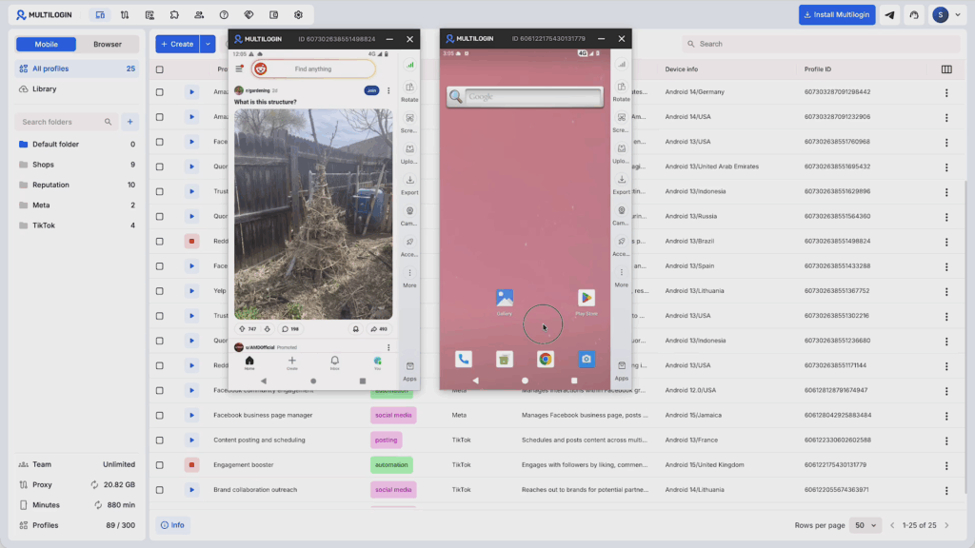
So when you log into TikTok from a Cloud Phone, the platform sees a real device being used by a real person in a real location. Because in a very real sense, it is.
What that means practically is that you can manage multiple TikTok accounts from one laptop and none of them are connected to each other in any way TikTok can pick up on. If one account runs into an issue, the others are completely untouched.
Everything runs from one screen and each account builds its own clean, natural activity history over time. There is also a built-in app marketplace where you can install TikTok, Instagram, or whatever else you need directly onto each Cloud Phone. Mobile proxies come included so there is nothing extra to set up on that front either.
Pricing starts at $7.08 per month on the annual plan and there is a $2 trial that gives you full access to test everything including the Cloud Phones before you commit to anything. You can see the full breakdown on the Multilogin pricing page.
Best Practices for Running Multiple TikTok Accounts Long Term
Once the setup is sorted, it really comes down to staying consistent and not cutting corners.
Every account needs its own real identity. Not just a different username but a different tone, different content style, a different reason to exist. Audiences can tell when something feels like a copy of something else, and so can the algorithm.
When you set up a new account, give it time before you start posting. Spend the first week using the app naturally. Watch videos, follow people, leave some comments. Accounts that start pushing content on day one without any prior activity look off, and TikTok treats them accordingly.
Try to stagger your posting times across accounts too. Everything going live at the same time across multiple profiles is a pattern that stands out more than most people expect.
Keep the analytics for each account separate. What works for one audience will not automatically land with another. Treat each profile as its own project with its own strategy and its own goals.
Growing Multiple TikTok Accounts the Right Way
More accounts does not always mean more growth. Before starting a new one, think about whether it has a genuinely different audience, a real content plan, and whether you can actually show up for it consistently over the next few months.
An account without a clear purpose is just extra work with very little return.
Start with one focused account, build it properly, and then add more once the first one is working. That is honestly how most successful multi-account creators do it.
Managing Multiple TikTok Accounts Is Easier Than You Think
Running multiple TikTok accounts does not have to be complicated or stressful. Most of the problems people run into come down to not having the right setup from the start.
Get each account its own space, give it its own identity, and treat it like its own project. Do that and you are already ahead of most people trying to do the same thing.
If you are serious about scaling, Multilogin Cloud Phones take the hard work out of keeping everything separate. Real devices, real proxies, everything isolated, all from one screen. Try it out for $2 and see how much simpler the whole operation gets.
The rest is just showing up consistently and making content people actually want to watch. That part is on you.